> This page is for Plattform, version Vorgängerversion.
> For other versions, use one of these documentation indexes:
> - V4 (default): https://next.developer.frame.io/platform/v4/llms.txt
> - V4 Experimental: https://next.developer.frame.io/platform/v4-experimental/llms.txt
> - Vorgängerversion: https://next.developer.frame.io/platform/v2/llms.txt
> For clean Markdown of any page, append .md to the page URL.
> For a complete documentation index, see https://next.developer.frame.io/llms.txt.
> For AI client integration (Claude Code, Cursor, etc.), connect to the MCP server at https://next.developer.frame.io/_mcp/server.
# Search for Assets
# Overview
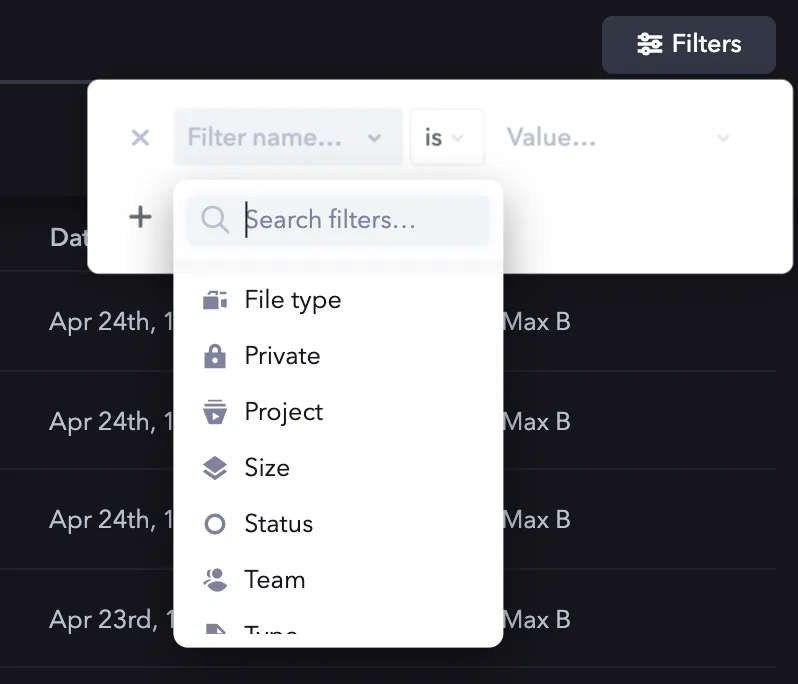
Frame.io's API supports deep, faceted search for Assets across an entire Account, mirroring the functionality in the web application. While the most commonly useful filters are Team, Project, and Status, filters and sorting can be combined in unique ways to produce extremely specific, API-driven sets. In general, all filters aside from the `account_id`, `q` (query), and `sort` follow the same structure, and all are explained below.
As of March, 2022, there is known a bug affecting the search API's paging function. Until this bug is addressed, we do not recommend using the search API to iterate over multiple pages of results (i.e. more than 100 assets), because the requested page size may not correspend with actual returned asset count.
## Defaults
The API request to trigger a search is always the same:
It's always the same request
`POST` to `https://api.frame.io/v2/search/library`
If not supplied explicitly, default values for search tuning are as follows:
|Attribute|Default value|Description|
|:--------|:------------|:----------|
|`page_size`|10|10 Assets will be returned per page.|
|`page`|1|The query will return the first page of the response.|
|`sort`|`relevance`|"Relevance" attempts to order assets based on a specifically tuned set of attributes. In the absence of a query, relevance is heavily skewed toward upload recency.|
## About this guide
This guide walks through the process of building a search query that matches:
- Assets within an Account
- That matches the query `"moon"`
- Is in a specific Project
- Was uploaded between April 1st and 30th, 2020
- And has been "Approved"
The body for our search will end up looking like this:
```json
{
"account_id": "",
"q": "moon",
"sort": "name",
"filter": {
"inserted_at": [
{
"op": "gte",
"value": "2020-04-01T04:00:00.000Z"
},
{
"op": "lte",
"value": "2020-04-30T03:59:59.999Z"
}
],
"project_id": {
"op": "eq",
"value": ""
},
"label": {
"op": "eq",
"value": "approved"
}
},
"page_size": 10,
"page": 1
}
```
### Account, query and sort
The Account (`account_id`), query (`q`), and `sort` are the three most basic building blocks that sit outside of any `filter` attributes in a search query.
#### Account context
Technically, the only attribute you need to perform a search is an `account_id`. Doing so will simply pull every Asset (including folders) on the Account, with default pagination values (10 Assets per page, starting on page 1).
```json
{
"account_id": ""
}
```
#### Search query
The next most common (and helpful) attribute to include is the query itself. Note: because Frame.io's API search accepts a null query, there is no need for a wildcard (`*`) query. You're either searching for something, or you're requesting a (potentially filtered) sort of all Assets in an Account.
In our case, we'll be searching for the term "moon".
```json
{
"account_id": "",
"q": "moon"
}
```
### Sorting
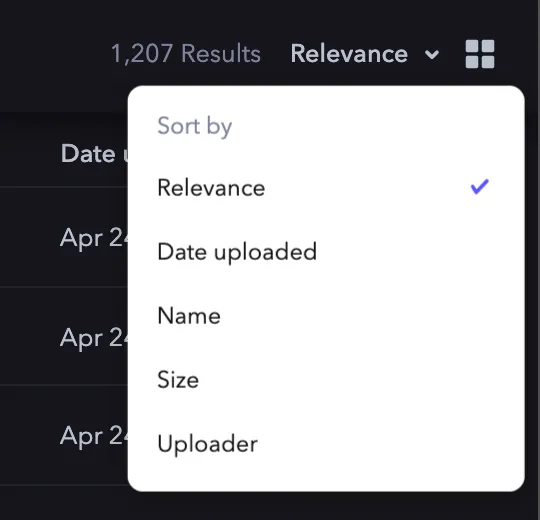
Frame.io supports a number of different sorting options. The syntax for sort order is similar across options:
- There is a default sort direction
- To reverse that direction, prefix the sort value with a negative `-`
For example, to sort in reverse alphabetical order (Z to A), you would declare `"sort": "-name"`.
The default sort operation is "Relevance." Accordingly, it does not need to be declared, and will be assumed if no `sort` attribute is provided.
|Sort option|Attribute|Default direction|
|:----------|:--------|:----------------|
|**Relevance**|n/a|n/a|
|**Date uploaded**|`inserted_at`|Oldest first|
|**Name**|`name`|A to Z|
|**Size**|`filesize`|Smallest first|
|**Uploader**|`creator.name`|A to Z|
Accordingly, as we build out our query, we can now add in our `sort` for `name`, A to Z:
```json
{
"account_id": "",
"q": "moon",
"sort": "name"
}
```
### Filters and pagination
Filters are both the trickiest, and most powerful feature of Frame.io's Asset search. Filters are written within a single `filter` object, and all follow the same pattern of an operation (`op`), and a `value`. Filters will use the following common abbreviations, with equivalency options other than "equals" reserved for date and size queries:
- `eq` -- equals
- `lt` -- less than
- `gt` -- greater than
- `lte` -- less than or equal to
- `gte` -- greater than or equal to
- `match` -- exact match, used only for Uploader and Filetype filters
For example, a `filter` to match on a known `project_id` would be constructed as follows:
```json
{
"filter": {
"project_id": {
"op": "eq",
"value": ""
}
}
}
```
### Options and operations
The following table describes the options and operations associated with each filter type.
|Filter option|Attribute|Supported operations|Supported values|
|:------------|:--------|:-------------------|:---------------|
|**Archived**|`archived`|`eq`|`true`, `false`|
|**Date uploaded**|`inserted_at`|`eq`, `lt`, `gt`, `lte`, `gte`|`` (ISO-8601, UTC)|
|**Deleted**|`deleted`|`eq`|`true`, `false`|
|**File type**|`filetype`|`match`|``|
|**Private**|`private`|`eq`|`true`, `false`|
|**Project**|`project_id`|`eq`|``|
|**Size**|`filesize`|`eq`, `lt`, `gt`, `lte`, `gte`|`size` (in bytes)|
|**Status**|`label`|`eq`|`none`, `in_progress`, `needs_review`, `approved`|
|**Team**|`team_id`|`eq`|``|
|**Type**|`asset_type`|`eq`|`audio`, `document`, `folder`, `image`, `other`, `stream`, `video`|
|**Uploader**|`creator.name`|`match`|``|
Searching for Creator's that are no longer members in the account will not work as that user is no longer in the User Search index.
To continue building out our query, we can now add a filter for Assets that are:
- Is in a specific Project
- Uploaded between April 1st and 30th, 2020
- Marked as "Approved"
```json
{
"account_id": "",
"q": "moon",
"sort": "name",
"filter": {
"inserted_at": [
{
"op": "gte",
"value": "2020-04-01T04:00:00.000Z"
},
{
"op": "lte",
"value": "2020-04-28T03:59:59.999Z"
}
],
"project_id": {
"op": "eq",
"value": ""
},
"label": {
"op": "eq",
"value": "approved"
}
}
}
```
The search endpoint paginates exactly as any other endpoint, via `page_size` and `page` attributes that sit at the outermost layer of the request body. For more details on pagination, please refer to the separate guide [here](/platform/v2/key-concepts#pagination).