
How to: Authorize
How to: Authorize
Introduction
This guide demonstrates the authentication and authorization process for Camera to Cloud (C2C) devices on a Frame.io project. We’ll explore both the standard manual code entry method and the enhanced QR code pairing approach for optimal user experience.
What Will I Need?
Please review the Before We Start Implementing guide if you haven’t already.
You should have received a client_secret from our team to identify your integration. If not, please consult this introduction to the C2C ecosystem and contact our team.
Prerequisites for URL & QR Code Pairing
To implement URL & QR code pairing, ensure you meet these requirements:
- Device Compatibility: Verify your device supports URL/QR code generation during the pairing process.
Walking Through the Auth Flow
To understand the authorization flow from a user perspective, please reference these resources:
- Support Article for adding new devices.
- Training video on authorizing a Teradek Cube.
This authorization process minimizes implementation requirements. You won’t need to:
- Redirect to web browsers (unless using URL Code Pairing)
- Handle Frame.io user authentication
- Present account/project selection interfaces
- Develop complex UI components beyond basic information displays
Enhancing the User Experience with URL Code Pairing
Modern users expect efficient device interactions. While the current manual pairing process functions adequately, it can be optimized.
By implementing URL & QR code pairing—similar to streaming services like Netflix or Disney+—we can significantly streamline the process, minimize input errors, and reduce pairing time.
Device Identification (client_id)
Each physical device requires a unique identifier for connection tracking within a user’s project.
For devices, this identifier is the client_id, which is essential during authorization. When implementing, consider appropriate identifier sources such as device serial numbers, UUIDs, or other unique strings. If you are integrating on an Apple device, we recommend using a unique persistent UUID that is consistent across device reboots.
Exercise caution regarding personally identifiable information. User email addresses are not appropriate client_id values.
Additionally, ensure you control the identifier. Device MAC addresses are unsuitable as they aren’t owned by your software and may constitute personally identifiable information.
If you need guidance on selecting an appropriate identifier, our team can assist in determining a suitable value that simplifies integration.
Step 1: Requesting a Device Code
To begin implementation, request a device code through the /v2/auth/device/code endpoint:
Traditional Pairing Method
Enabling URL Code Pairing
For URL code pairing, modify the API call with additional headers:
Note: These authentication endpoints accept form data exclusively, not JSON. Post-authentication, other endpoints will accept JSON payloads, but authentication endpoints will reject JSON requests.
Payload Parameters
- client_id: The unique identifier for your physical device. This must be guaranteed unique, such as a serial number or UUID.
- client_secret: Provided by Frame.io support to identify your device model. This confidential value should remain protected from users and encrypted when stored.
- scope: The requested permissions, separated by spaces. Devices may request:
asset_create: Enables asset creation and uploading.offline: Permits authorization refreshing via refresh token. Without this scope, users would need to re-authorize their device every 8 hours as authorization tokens expire.
In practical implementations, devices typically request both scopes.
Understanding the API Response
The request generates a response similar to:
Traditional Pairing Response
URL Pairing Response
Response Breakdown
- device_code: This internal identifier should remain hidden from users and identifies the authorization request during polling.
- expires_in: The code’s validity period in seconds.
- interval: The recommended polling interval in seconds.
- name: The connecting device’s identifier.
- user_code: The six-digit code for manual entry into Frame.io for device pairing.
- verification_uri: The base URL for manual entry if QR scanning is unavailable.
- verification_uri_complete: The full URL containing the pairing code, intended for hyperlinking within a mobile app or QR code generation to streamline user navigation to the pairing interface.
Displaying the QR Code to the User
Using the verification_uri_complete, generate and display a QR code on the device screen for the user to scan, facilitating efficient pairing.
Example: Device Screen with QR Code Displayed
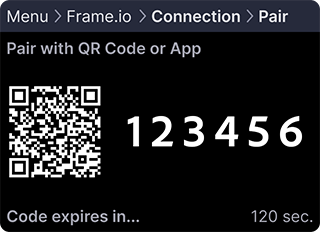
Always provide fallback options: display the user_code and verification_uri for manual entry when QR scanning isn’t possible. Alternatively, consider displaying the verification_uri as a static QR code for mobile scanning.
For mobile app integrations, include the verification_uri_complete as a tappable hyperlink since users cannot scan QR codes from the device running the app.
Step 2: Polling for User Authorization
After providing the pairing code or URL code, verify user entry with this request:
Payload Parameters
- client_id: The same identifier used in Step 1.
- device_code: The
device_codevalue returned previously. - grant_type: The OAuth grant type identifier, consistently
urn:ietf:params:oauth:grant-type:device_codefor this implementation.
Initial polling attempts typically return:
This non-fatal error indicates the user hasn’t completed code entry. Continue polling until completion.
Note for iOS app devices: If the user switches to the Frame.io iOS app to enter the pairing code, your app may move to the background. When your app becomes active again, such as in
applicationDidBecomeActive, resume polling so the authorization flow can continue without requiring the user to restart pairing.
If you receive:
The code expired before user entry. Generate a new code/QR code via Step 1, present it to the user, and resume polling.
Successful authorization produces:
Congratulations on successfully authorizing your Camera to Cloud device!
Let’s examine this response:
- access_token: Your authentication credential for Frame.io backend access, required in headers for future API requests.
- expires_in: The access token validity period in seconds, after which refreshing is necessary.
- refresh_token: Used for access token management, primarily for refreshing authorization but also applicable for revocation.
- token_type: Consistently
bearerfor C2C API implementations, requiring no action.
Putting the Steps Together
Now let’s implement these API calls in Python-like pseudocode, handling potential device code expiration:
Note: The outer loop handles cases where pairing codes expire and new codes are required.
As a final step, retrieve and display project information from Frame.io to confirm successful pairing to the intended project. We’ll cover this in the next tutorial.
Creating and Displaying QR Codes for Pairing
When implementing URL/QR code pairing, you’ll need to generate a QR code from the verification_uri_complete value in the response. Here are examples using popular libraries in different programming languages:
Python Example using qrcode
JavaScript Example (Web or Electron)
Android Example (Java)
iOS Example (Swift)
Best Practices for QR Code Display
When implementing QR code pairing, consider these guidelines for the best user experience:
-
Optimal Size: Display QR codes at least 200-250 pixels square for reliable scanning.
-
Contrast: Ensure high contrast between QR code and background (black on white is ideal).
-
Error Correction: Use moderate error correction levels (L or M) to balance code density and reliability.
-
Clear Instructions: Provide clear guidance on how to scan the code, such as “Scan this code with your smartphone camera to pair your device.”
-
Multiple Options: Always provide the manual pairing code alongside the QR code as a fallback:
-
Hyperlink for Mobile Apps: If your integration is a mobile application, include the
verification_uri_completeas a tappable link since users cannot scan a QR code from the same device. -
Testing: Test your QR codes with various devices and lighting conditions to ensure reliable scanning.
Troubleshooting
If you encounter issues, consult these common scenarios and solutions:
- “Connect Device” Button Not Visible: When accessing the C2C management panel, this could indicate:
- Insufficient Permissions: If you see a permissions message, contact your account manager to adjust permissions or assign an appropriate role.
- Existing Device Connection: After connecting one device, the primary “Add New Device” button is replaced by a three-dot menu in the upper-right corner of the C2C Connections panel.
- Invalid Client Error: An
invalid_clientresponse indicates device information mismatch, typically due to an incorrectclient_secret. - Bad Request Error: A
bad_requestresponse indicates malformed request data. Verify field names and ensure all required fields are included.
If your issue isn’t addressed here, please share your experience so we can enhance this troubleshooting section.
Next Steps
We encourage you to contact our team and proceed to the authorization management guide. We look forward to your feedback!